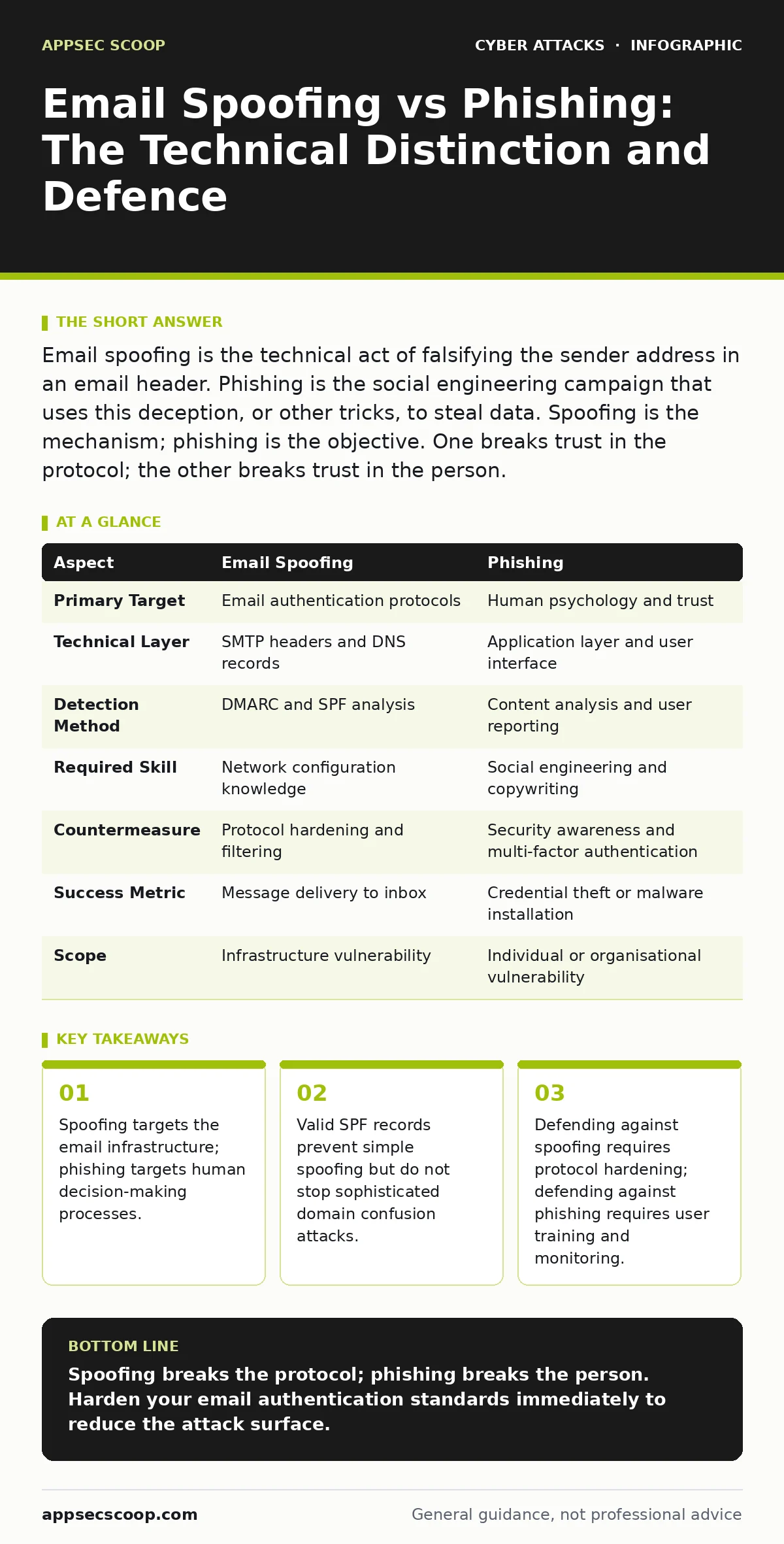
Email spoofing is the technical act of falsifying the sender address in an email header. Phishing is the social engineering campaign that uses this deception, or other tricks, to steal data. Spoofing is the mechanism; phishing is the objective. One breaks trust in the protocol; the other breaks trust in the person.
The Core Difference Between Email Spoofing and Phishing
Email spoofing refers to the manipulation of email headers to make the message appear as if it originated from a trusted source. The attacker alters the "From" field or other header components to mimic a legitimate domain. This is a technical subversion of the Simple Mail Transfer Protocol. Phishing is the broader campaign of deception. It uses the spoofed email, or a legitimate one, to trick the recipient into performing an action. The action might involve clicking a link, opening a malicious email attachments, or replying with sensitive information. Spoofing is the tool; phishing is the strategy.
How Email Spoofing Works Technically
Attackers exploit the stateless nature of early email standards. When you send an email, the server relays it to the next server. The final server trusts the sender address provided in the header. Without verification, any machine can claim to be anyone. Modern defences rely on three open standards. Sender Policy Framework lists the authorised mail servers for a domain. DomainKeys Identified Mail adds a cryptographic signature to verify the message was not altered. Domain-based Message Authentication, Reporting and Conformance combines these checks and tells receiving servers what to do with failures. If these are missing, spoofing is trivial.
The Mechanics of Phishing Campaigns
Phishing relies on urgency, authority or curiosity. The attacker crafts a narrative that bypasses critical thinking. A common scenario involves a message claiming a password will expire. The recipient feels pressure to act quickly. The email may contain a link to a fake login page. This page looks identical to the real service. When you enter your credentials, they go to the attacker. Sometimes the email contains no links. It simply asks you to reply with a document. The goal is always to extract value. The method varies from mass blasts to highly targeted spear phishing.
Email Spoofing vs Phishing: A Point-by-Point Comparison
The distinction matters for your defence strategy. You cannot fix a psychological trick with a firewall rule. You cannot stop a header forgery with user training alone. The table below clarifies where each threat lives and how it behaves.
| Aspect | Email Spoofing | Phishing |
|---|---|---|
| Primary Target | Email authentication protocols | Human psychology and trust |
| Technical Layer | SMTP headers and DNS records | Application layer and user interface |
| Detection Method | DMARC and SPF analysis | Content analysis and user reporting |
| Required Skill | Network configuration knowledge | Social engineering and copywriting |
| Countermeasure | Protocol hardening and filtering | Security awareness and multi-factor authentication |
| Success Metric | Message delivery to inbox | Credential theft or malware installation |
| Scope | Infrastructure vulnerability | Individual or organisational vulnerability |
When To Choose Which Defence Strategy
You must address both layers. If you only fix the headers, users will still fall for CEO fraud via legitimate accounts. If you only train users, they will miss the subtle technical indicators of a compromise. Choose technical controls when you need to reduce the volume of incoming threats. Choose behavioural controls when you need to catch the threats that slip through.
See also: How Malicious Email Attachments Work: The Execution Chain · CEO Fraud: How Impersonation Attacks Bypass Standard Controls
Choose Spoofing Defences When
- Your organisation receives a high volume of external email.
- You have not published DMARC policies for your domains.
- Attackers are successfully impersonating your brand in bulk.
- You need to automate the rejection of unauthenticated messages.
- Your security operations teams lack visibility into header data.
Implementing strict DMARC policies tells receiving servers to reject emails that fail authentication. This stops most simple spoofing. It does not stop an attacker who compromises a legitimate account. It also does not stop an attacker who registers a look-alike domain. You must monitor these failures. Use intrusion detection systems to flag unusual authentication patterns. This reduces the noise for your analysts.
Choose Phishing Defences When
- Users frequently report suspicious emails that passed technical filters.
- Your industry is a target for business email compromise.
- You rely on sensitive data handled by non-technical staff.
- Attackers are using legitimate services to send deceptive messages.
- You need to detect behavioural anomalies in user activity.
Technical filters cannot read intent. A message from a legitimate vendor may contain a deceptive link. This is not spoofing. It is phishing. You must train users to hover over links and check URLs. You must enforce multi-factor authentication. Even if a user gives away their password, the attacker cannot access the account without the second factor. Consider zero trust security principles. Verify every request as if it comes from an untrusted network. This limits the damage of a successful phishing attempt.
Where The Defences Overlap
The boundary blurs in advanced attacks. An attacker might use a subdomain that passes SPF checks but looks like your main domain. This is a form of visual spoofing. It requires both technical monitoring and user awareness. You must monitor for new domain registrations that resemble your brand. You must also train users to look closely at the sender address. Regular tabletop exercises help your team respond when these lines blur. They prepare you for scenarios where technical controls fail and human error occurs.
Key takeaways
- Spoofing targets the email infrastructure; phishing targets human decision-making processes.
- Valid SPF records prevent simple spoofing but do not stop sophisticated domain confusion attacks.
- Defending against spoofing requires protocol hardening; defending against phishing requires user training and monitoring.
Spoofing breaks the protocol; phishing breaks the person. Harden your email authentication standards immediately to reduce the attack surface.
Frequently asked questions
Can a phishing email be sent without spoofing?
Yes. Attackers often use legitimate compromised accounts or look-alike domains that pass authentication checks. The deception lies in the content, not the headers.
Does multi-factor authentication stop all phishing?
No. It stops account takeover if the user hands over their password. It does not stop data leakage via replies or the installation of malware through malicious email attachments.
Is email spoofing illegal?
Laws vary by jurisdiction. Many countries have laws against identity theft and fraud. However, the technical act of sending an email with a false header is often a byproduct of the fraud, not a standalone crime in all regions.
How this guide was produced: written by the AppSec Scoop editorial team with AI assistance, checked against the public references listed below, and reviewed when the facts change. See our editorial policy or report an error.