Malicious attachments bypass filters by using obscure file types or embedded code. Once opened, they exploit application vulnerabilities or social engineering to execute scripts. This chain relies on the recipient trusting the sender and the endpoint lacking strict application control, allowing the attacker to establish persistence on the system.
The Initial Delivery Vector
The attack begins long before the recipient opens the file. The attacker crafts a message that appears legitimate, often mimicking a routine business communication. This relies on the assumption that users will not scrutinise the sender address or the context of the request. The email itself is rarely the weapon; it is merely the transport mechanism.
The attachment is designed to look harmless. It might be a PDF invoice, a text document, or an image file. The attacker chooses a format that is commonly accepted in business environments. This reduces the likelihood of the file being flagged by perimeter filters. The goal is to get the file onto the victim’s device without triggering an immediate alert.
File Type Confusion and Obfuscation
Modern email security gateways scan for known malicious signatures. To bypass this, attackers use file type confusion. This involves renaming a dangerous file extension to a benign one, such as changing .exe to .doc. The operating system may still recognise the true file type based on its internal header, but the user sees only the misleading extension.
Another technique involves embedding malicious code within a legitimate file format. For example, a PDF might contain a JavaScript object that executes when the document is rendered. The file passes standard scans because the container itself is valid. The malicious payload is hidden within the structure of the document. This is similar to the mechanisms used in HTML smuggling, where the payload is only assembled when the email client renders the content.
The Social Engineering Trigger
The file sits in the inbox, waiting for interaction. The attacker relies on psychological pressure to prompt the user to open the attachment. The subject line might suggest urgency, such as a missed delivery or a security alert. The body of the email provides a reason to open the file immediately.
This stage is critical because automated systems cannot detect intent. The firewall sees a valid PDF; the spam filter sees a polite request. Only the human recipient can judge whether the context makes sense. If the user opens the file out of curiosity or obligation, the attack moves to the next phase. This is where spear phishing techniques become effective, as the attacker tailors the message to the specific role of the recipient.
Application Exploitation and Execution
Once the file is opened, the application handling it becomes the target. If the application is outdated, it may contain a known vulnerability that allows code execution. The attacker exploits this flaw to run arbitrary commands on the system. This is known as a remote code execution vulnerability.
If the application is patched, the attacker relies on the application’s features. Microsoft Office documents, for example, can contain macros. These are small scripts that automate tasks. The user is prompted to enable macros to view the content correctly. If the user clicks enable, the script runs. This is a deliberate design feature that attackers abuse. The script does not need to exploit a bug; it simply uses the application’s intended functionality.
Payload Delivery and Persistence
The initial script rarely contains the final malware. Instead, it acts as a downloader. It connects to a remote server to retrieve the actual payload. This keeps the initial attachment small and less suspicious. The payload might be a remote access trojan or a data exfiltration tool.
Once downloaded, the malware attempts to establish persistence. This means it modifies the system so it runs every time the computer starts. It might create a scheduled task or modify registry keys. This ensures that even if the user logs off, the attacker retains access. The system now appears normal, but the attacker has a foothold. This is where endpoint protection solutions must detect the behavioural change rather than just the file hash.
See also: CEO Fraud: How Impersonation Attacks Bypass Standard Controls · Sandboxing: How Isolated Execution Stops Malware Before It Runs
Lateral Movement and Impact
With access to one machine, the attacker looks for more. They search for credentials stored in browsers or password managers. They scan the network for other vulnerable systems. This is lateral movement. The goal is to reach high-value targets, such as domain controllers or financial servers.
The impact depends on what the attacker finds. They might steal intellectual property, encrypt files for ransom, or disrupt operations. The damage is often not immediate. The attacker may remain dormant for weeks, mapping the environment. This stealth makes detection difficult. Security teams must monitor for unusual network traffic or privilege escalations. This is why tabletop exercises are valuable, as they help teams prepare for this specific scenario.
Interruption Points and Defences
The attack chain has multiple weak points. Defences can be applied at each stage to stop the progression. Blocking the initial delivery is the first line of defence. However, this is rarely perfect. The second line is preventing the user from opening the file. This requires user awareness and strict policies.
The third line is preventing execution. Application control policies can restrict which programs can run. If a PDF tries to launch a command prompt, the system should block it. The final line is detection. Monitoring for unusual behaviour can catch the attack after it has started. This layered approach is necessary because no single control is sufficient.
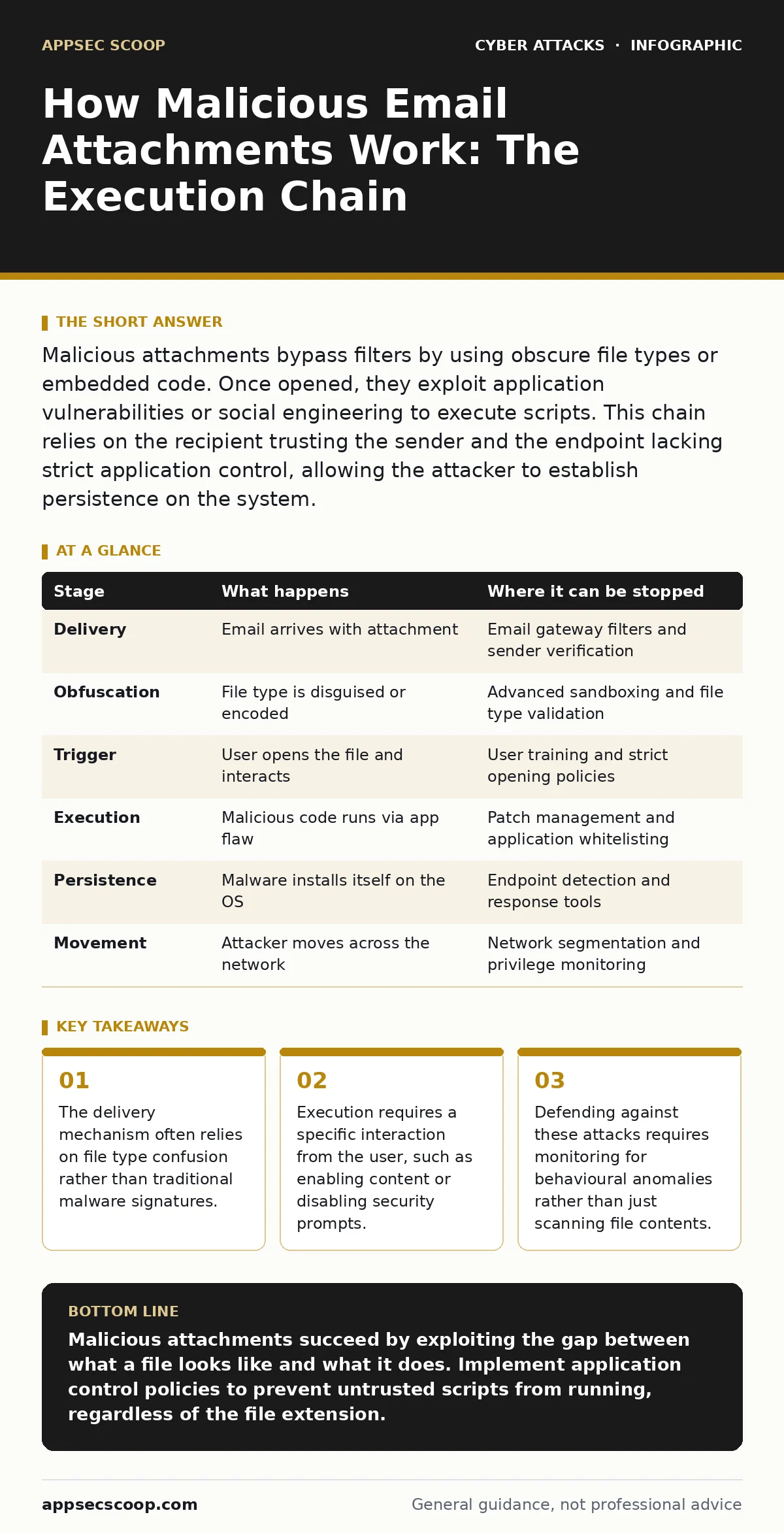
| Stage | What happens | Where it can be stopped |
|---|---|---|
| Delivery | Email arrives with attachment | Email gateway filters and sender verification |
| Obfuscation | File type is disguised or encoded | Advanced sandboxing and file type validation |
| Trigger | User opens the file and interacts | User training and strict opening policies |
| Execution | Malicious code runs via app flaw | Patch management and application whitelisting |
| Persistence | Malware installs itself on the OS | Endpoint detection and response tools |
| Movement | Attacker moves across the network | Network segmentation and privilege monitoring |
The Hidden Cost of False Confidence
Many organisations believe that blocking executable files is sufficient. This is a dangerous assumption. Attackers rarely send .exe files directly. They send documents that trigger execution. The user feels safe because the file type is benign. This false sense of security lowers their guard.
Another hidden cost is the complexity of monitoring. Detecting the behavioural changes requires sophisticated tools. These tools generate many alerts. Analysts must sift through these alerts to find the real threats. This creates fatigue and can lead to missed detections. The defence is not just technology; it is also process and patience.
Key takeaways
- The delivery mechanism often relies on file type confusion rather than traditional malware signatures.
- Execution requires a specific interaction from the user, such as enabling content or disabling security prompts.
- Defending against these attacks requires monitoring for behavioural anomalies rather than just scanning file contents.
Malicious attachments succeed by exploiting the gap between what a file looks like and what it does. Implement application control policies to prevent untrusted scripts from running, regardless of the file extension.
Frequently asked questions
Can a PDF file contain malware?
Yes, PDF files can contain JavaScript or embedded objects that execute code when the document is opened or interacted with.
Why do attackers use macros in documents?
Macros are a built-in feature of many office applications that allow automation, which attackers abuse to run malicious scripts without exploiting software bugs.
How do I know if an attachment is safe?
You cannot be certain by looking at the file. Always verify the sender through a separate channel and ensure your security software is configured to block untrusted scripts.
Does updating my software stop these attacks?
Updating patches known vulnerabilities, but it does not stop social engineering or the use of legitimate features like macros for malicious purposes.
How this guide was produced: written by the AppSec Scoop editorial team with AI assistance, checked against the public references listed below, and reviewed when the facts change. See our editorial policy or report an error.