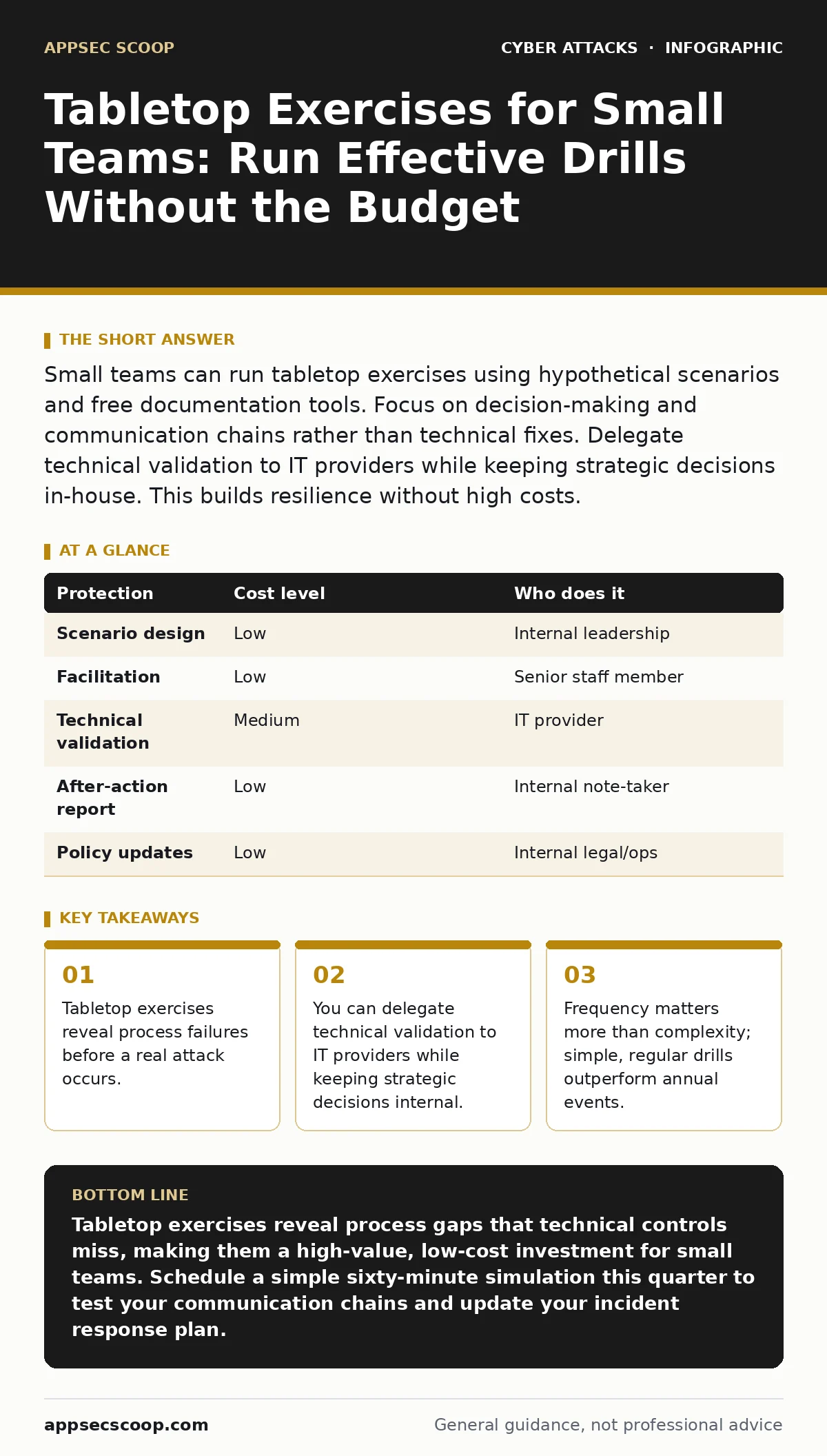
Small teams can run tabletop exercises using hypothetical scenarios and free documentation tools. Focus on decision-making and communication chains rather than technical fixes. Delegate technical validation to IT providers while keeping strategic decisions in-house. This builds resilience without high costs.
The Hidden Cost of Silence
Technical controls like endpoint protection and intrusion detection systems are necessary but insufficient. They assume that when an alert fires, someone knows what to do. In small organisations, roles are often fluid. The person who manages the network may also handle customer support. When a crisis hits, this ambiguity causes paralysis.
Tabletop exercises address this gap. A tabletop exercise is a discussion-based simulation where participants walk through a hypothetical incident. You do not touch any systems. You sit in a room, or a video call, and talk through the steps. The goal is to identify where the process breaks down.
The primary value is not finding a new tool. It is finding a missing phone number, a vague policy, or a bottleneck in approval chains. These failures are invisible during daily operations. They only become apparent when time pressure is applied.
Designing Scenarios That Stick
A scenario must be plausible for your specific context. If you do not handle sensitive health data, do not simulate a medical data breach. Instead, look at your actual attack surface. Small businesses are frequent targets of CEO fraud because they have fewer layers of verification.
Suppose your scenario involves a request to transfer funds to a new vendor account. The email comes from the boss’s address. The urgency is high. The recipient is a junior staff member with limited authority. Walk through the minutes after receipt. Who is called? What is the verification method? Is there a pre-agreed code word or secondary channel for financial changes?
Avoid overly complex technical narratives. You are testing human response, not server configuration. If the scenario requires understanding HTML smuggling or watering hole attacks, you are likely drifting into technical training. Keep the focus on communication and decision-making. The technical details are background noise. The decision is the signal.
Running the Drill Efficiently
You do not need a facilitator from a consultancy. A senior team member can lead the session. Set a time limit of sixty to ninety minutes. Longer sessions lead to fatigue and diminishing returns. Prepare a simple one-page document outlining the scenario. Include the timeline, the affected systems, and the initial impact.
Start by describing the incident. Then, pause. Ask participants what they would do next. Record their answers. If they say "call the IT provider," ask what information they would provide. If they say "shut down the server," ask who approves that action. These pauses reveal the friction points.
Do not judge the answers. The goal is to map the current state, not to critique it. If the process is slow, note it. If a role is unclear, note it. The discomfort of the exercise is the point. It forces you to confront the reality of your preparedness.
| Protection | Cost level | Who does it |
|---|---|---|
| Scenario design | Low | Internal leadership |
| Facilitation | Low | Senior staff member |
| Technical validation | Medium | IT provider |
| After-action report | Low | Internal note-taker |
| Policy updates | Low | Internal legal/ops |
What to Delegate to Providers
You cannot validate every technical claim during a tabletop exercise. You do not know if your backup system is truly restorable, or if your cyber hygiene practices are sufficient. This is where you delegate.
Invite your IT provider or managed service provider to the session. Their role is to answer technical feasibility questions. When a participant says "we will isolate the infected machine," the provider confirms whether that is technically possible with your current setup. They might reveal that remote isolation is not supported by your current hardware.
This prevents the exercise from becoming a fantasy. It grounds the discussion in reality. However, do not let them drive the strategic decisions. The provider knows the technology, but they do not know your business priorities. Only you can decide if a two-hour downtime is acceptable.
Questions for Your IT Provider
Use the exercise to test your provider’s responsiveness. You are not just testing your team; you are testing your external support. Prepare a list of questions to ask during or after the simulation.
- What is your guaranteed response time for a critical security incident?
- How do you verify the identity of the person requesting emergency access?
- What logs do you retain, and for how long?
- Can you demonstrate the restoration of a single file from backup?
- Who is the secondary contact if the primary engineer is unavailable?
These questions move the relationship from transactional to collaborative. They ensure that your provider is aligned with your operational needs. If they cannot answer these questions confidently, you have identified a significant risk.
See also: Breach Dwell Time: Why Detection Delays Multiply Risk · Cloud Access Key Leak Warning Signs and Immediate Containment Steps
Iterating on the Results
The exercise is useless if you do not act on the findings. Create a simple action list. Assign an owner and a deadline to each item. Do not aim for perfection. Aim for incremental improvement.
Review the list in your next team meeting. Close out items as they are completed. Then, schedule the next exercise. Frequency is more important than depth. A simple drill every six months keeps the process fresh. An annual event leads to complacency.
Document the changes you make. Update your incident response plan. If you added a secondary contact, write it down. If you changed the verification process for malicious email attachments, record the new steps. This documentation becomes your baseline for the next cycle.
Integrating with Daily Operations
Tabletop exercises should not feel like a separate burden. Integrate them into your regular rhythm. Combine them with quarterly business reviews or annual planning sessions. This reduces the administrative overhead.
Encourage a culture of questioning. If a staff member notices a gap in the process, they should feel safe raising it. This is not about blame; it is about improvement. The more open the culture, the more effective the exercises become.
Remember that technology changes. New tools like advanced spear phishing detection may alter your workflow. Revisit your scenarios when major changes occur. A new cloud migration or a change in leadership structure warrants a fresh look at your response plan.
The goal is resilience, not perfection. You will never eliminate all risk. But you can ensure that when the inevitable incident occurs, your team knows exactly what to do. This clarity reduces stress, minimises damage, and protects your reputation.
Key takeaways
- Tabletop exercises reveal process failures before a real attack occurs.
- You can delegate technical validation to IT providers while keeping strategic decisions internal.
- Frequency matters more than complexity; simple, regular drills outperform annual events.
Tabletop exercises reveal process gaps that technical controls miss, making them a high-value, low-cost investment for small teams. Schedule a simple sixty-minute simulation this quarter to test your communication chains and update your incident response plan.
Frequently asked questions
How often should a small business run a tabletop exercise?
Every six months is a good baseline. Run additional drills after significant changes to your infrastructure, staff, or business processes.
Do we need external consultants to run a tabletop exercise?
No. Internal staff can design and facilitate the exercise. External consultants add value but are not required for effective results.
What if we do not have a formal incident response plan?
Use the exercise to create one. The discussion will reveal your current ad-hoc processes. Document these as your first draft.
Can we include remote staff in the exercise?
Yes. Use video conferencing tools to include remote participants. This tests your ability to coordinate across different locations.
How this guide was produced: written by the AppSec Scoop editorial team with AI assistance, checked against the public references listed below, and reviewed when the facts change. See our editorial policy or report an error.