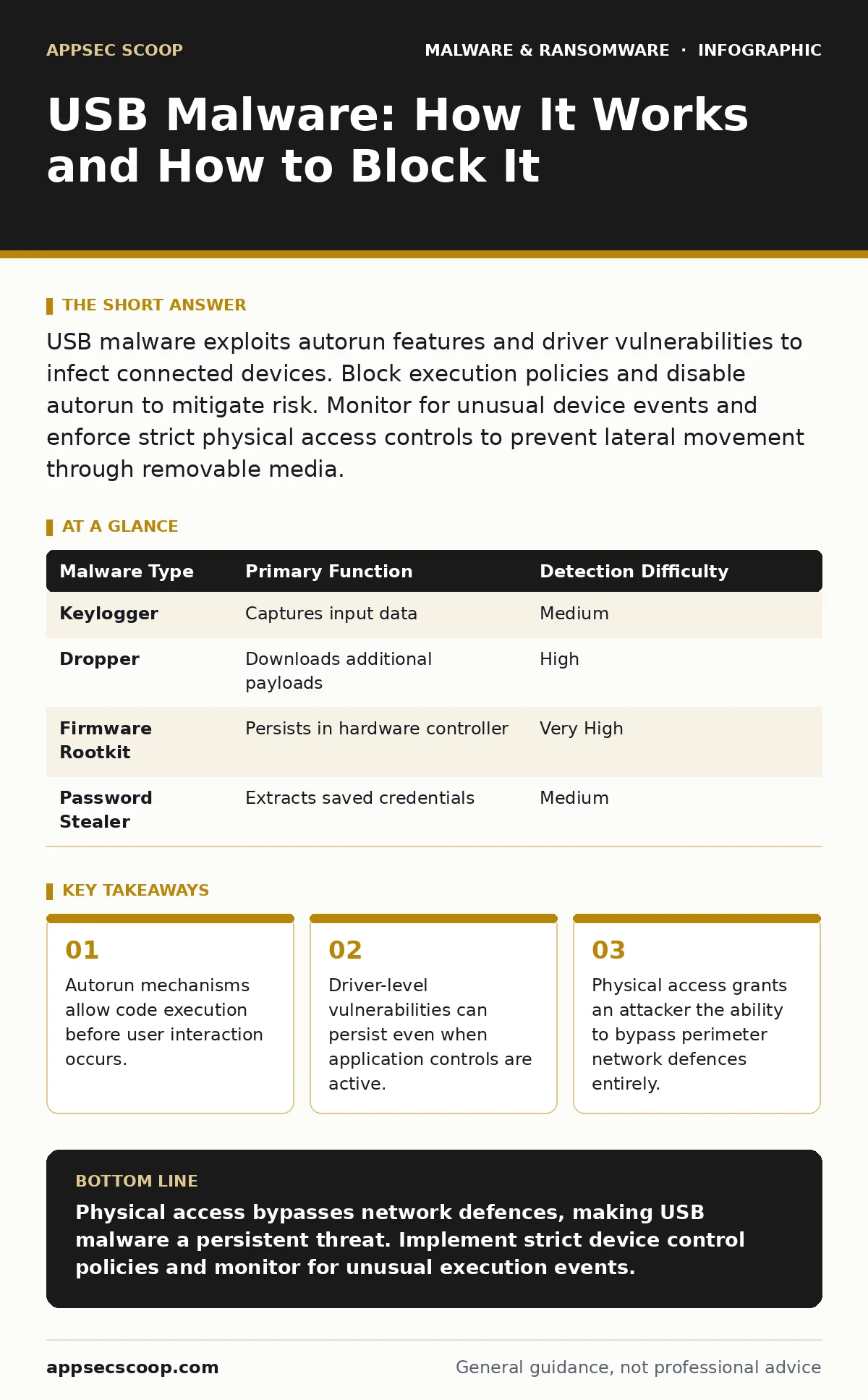
USB malware exploits autorun features and driver vulnerabilities to infect connected devices. Block execution policies and disable autorun to mitigate risk. Monitor for unusual device events and enforce strict physical access controls to prevent lateral movement through removable media.
Does plugging in a USB drive automatically install malware?
No, modern operating systems do not execute code from removable media by default. Older systems relied on autorun files, which triggered software installation when a drive was inserted. Current Windows versions ignore these triggers unless explicitly enabled by the user. However, the drive still mounts, allowing malware to hide in the file system. Attackers often rely on user curiosity or urgency to trigger the infection manually.
How do attackers infect USB drives in the first place?
They typically use infected computers to copy malicious files onto the drive. Imagine a shared computer in a public library or a café. An attacker installs a dropper, a small program that hides itself and waits for a USB connection. When you plug your drive in, the dropper copies the payload to your device. It may also alter the drive’s file system to hide its presence from standard directory listings.
Can a USB drive damage my computer hardware?
Standard USB malware cannot physically destroy components like hard drives or motherboards. The Universal Serial Bus specification limits power delivery and data rates to safe levels. However, malicious firmware can be flashed onto the USB controller itself. This transforms the drive into a keyboard or network adapter. Once recognised as a trusted input device, it can send commands to the host system. This bypasses application-level security controls entirely.
Why do standard antivirus scans miss USB infections?
Many scanners only inspect known file signatures and ignore low-level system events. They often fail to detect fileless malware, which runs in memory without writing to disk. Additionally, USB drives may contain encrypted partitions or hidden volumes. These areas are inaccessible to standard file system scanners. The malware may also use obfuscation techniques to disguise its code structure. This makes signature-based detection ineffective against novel threats.
Is disabling autorun enough to stop USB malware?
Disabling autorun prevents automatic execution of files like Autorun.inf. It does not stop a user from manually opening a malicious executable. Attackers often name files to mimic system utilities or common documents. They may also use social engineering to persuade the user to run the file. Furthermore, some malware exploits vulnerabilities in the shell extension handlers. These handlers process file icons and metadata, allowing code execution without running the main file.
See also: What Malware Payloads Actually Do and How Analysts Misread Them · Endpoint Protection Checklist for Secure Device Management
How does USB malware spread within a network?
Once on a workstation, the malware can traverse the network if credentials are compromised. It may harvest saved passwords or session tokens from the browser. These credentials allow the malware to access shared drives and remote servers. From there, it can propagate to other endpoints that map network drives. This lateral movement is often silent, avoiding detection by perimeter firewalls. The initial USB infection acts as the beachhead for a wider breach.
Can I clean an infected USB drive safely?
Formatting the drive removes the file system and all data on it. This eliminates most malware, including those hiding in hidden partitions. However, if the infection resides in the drive’s firmware, formatting will not remove it. Firmware-based malware persists because it is stored in the controller’s read-only memory. The only reliable fix for firmware infections is replacing the drive. Do not attempt to reuse a drive that exhibits unusual behaviour after a format.
What are the most common types of USB malware?
Keyloggers are prevalent, recording keystrokes to steal credentials. They often disguise themselves as system drivers to avoid detection. Another common type is the dropper, which downloads larger payloads from remote servers. This keeps the initial infection small and fast. Some USB malware acts as a botnet client, turning infected machines into part of a distributed network. This allows attackers to launch coordinated attacks from multiple locations.
| Malware Type | Primary Function | Detection Difficulty |
|---|---|---|
| Keylogger | Captures input data | Medium |
| Dropper | Downloads additional payloads | High |
| Firmware Rootkit | Persists in hardware controller | Very High |
| Password Stealer | Extracts saved credentials | Medium |
How do enterprise policies handle removable media?
Organisations often use Group Policy Objects to restrict USB access. These policies can block all removable storage or allow only authorised devices. Whitelisting specific drive serial numbers is a common approach. However, this creates administrative overhead and may hinder legitimate business needs. A balanced approach involves blocking execution while allowing data transfer. This requires robust logging and monitoring of file access events.
Does encryption protect against USB malware?
Encryption protects data at rest, preventing theft if the drive is lost. It does not prevent malware from executing when the drive is connected to a host. Once the drive is mounted and decrypted, the malware can run freely. The host system remains vulnerable to infection regardless of the drive’s encryption status. Encryption is a data protection measure, not a security control for execution.
How can I detect USB malware activity?
Monitor for unusual process creation events involving removable drives. Look for scripts or executables launching from the root directory of a USB volume. Check for new network connections initiated by processes associated with removable media. Anomalous power consumption or unexpected device enumeration can also indicate firmware attacks. Behavioural analysis is more effective than signature scanning for these threats. Refer to our guide on behavior-based detection for deeper insights into monitoring techniques.
What about bad USB devices that mimic keyboards?
These devices, often called rubber ducky clones, inject keystrokes rapidly. They bypass application whitelisting because the operating system treats them as human input. The commands can open command prompts, download scripts, and execute payloads. This method is highly effective against air-gapped systems. Physical security is the primary defence against such devices.
How do I secure my organisation against USB threats?
Implement a layered defence strategy. Disable autorun and restrict execution policies to trusted paths. Use endpoint detection and response tools to monitor for suspicious behaviour. Educate users on the risks of connecting unknown devices. Regularly audit physical access points and port usage. Consider our guide on removing malware from a Windows PC for remediation steps if an infection occurs.
Are there legal implications for USB malware attacks?
Attacking a system via USB is a criminal act in most jurisdictions. However, the legal framework often lags behind technical capabilities. Victims may struggle to prove the method of entry. Forensic analysis of the USB controller firmware can provide evidence. This process is complex and requires specialised expertise. Legal recourse is often limited to civil damages rather than criminal prosecution.
Can USB malware encrypt files like ransomware?
Yes, USB drives can carry ransomware payloads. The malware encrypts files on the connected drive and demands payment for decryption. It may also spread to networked drives, encrypting shared resources. This variant is particularly dangerous in environments with mapped network drives. The initial infection vector is physical, but the impact is digital. See our guide on malware payloads for more details on encryption mechanisms.
Key takeaways
- Autorun mechanisms allow code execution before user interaction occurs.
- Driver-level vulnerabilities can persist even when application controls are active.
- Physical access grants an attacker the ability to bypass perimeter network defences entirely.
Physical access bypasses network defences, making USB malware a persistent threat. Implement strict device control policies and monitor for unusual execution events.
Frequently asked questions
Can a USB virus spread through a USB cable?
No, data transfer requires a connected device. A cable alone cannot transmit malware without a host system.
Do antivirus programs scan USB drives automatically?
Many do, but configuration is required. Ensure your security software is set to scan removable media on insertion.
Is it safe to use USB drives for file transfer?
It is risky. Use encrypted cloud storage or secure network transfers instead to avoid physical access risks.
Can I remove USB malware without formatting?
Only if it is file-based. Firmware infections require drive replacement.
How this guide was produced: written by the AppSec Scoop editorial team with AI assistance, checked against the public references listed below, and reviewed when the facts change. See our editorial policy or report an error.