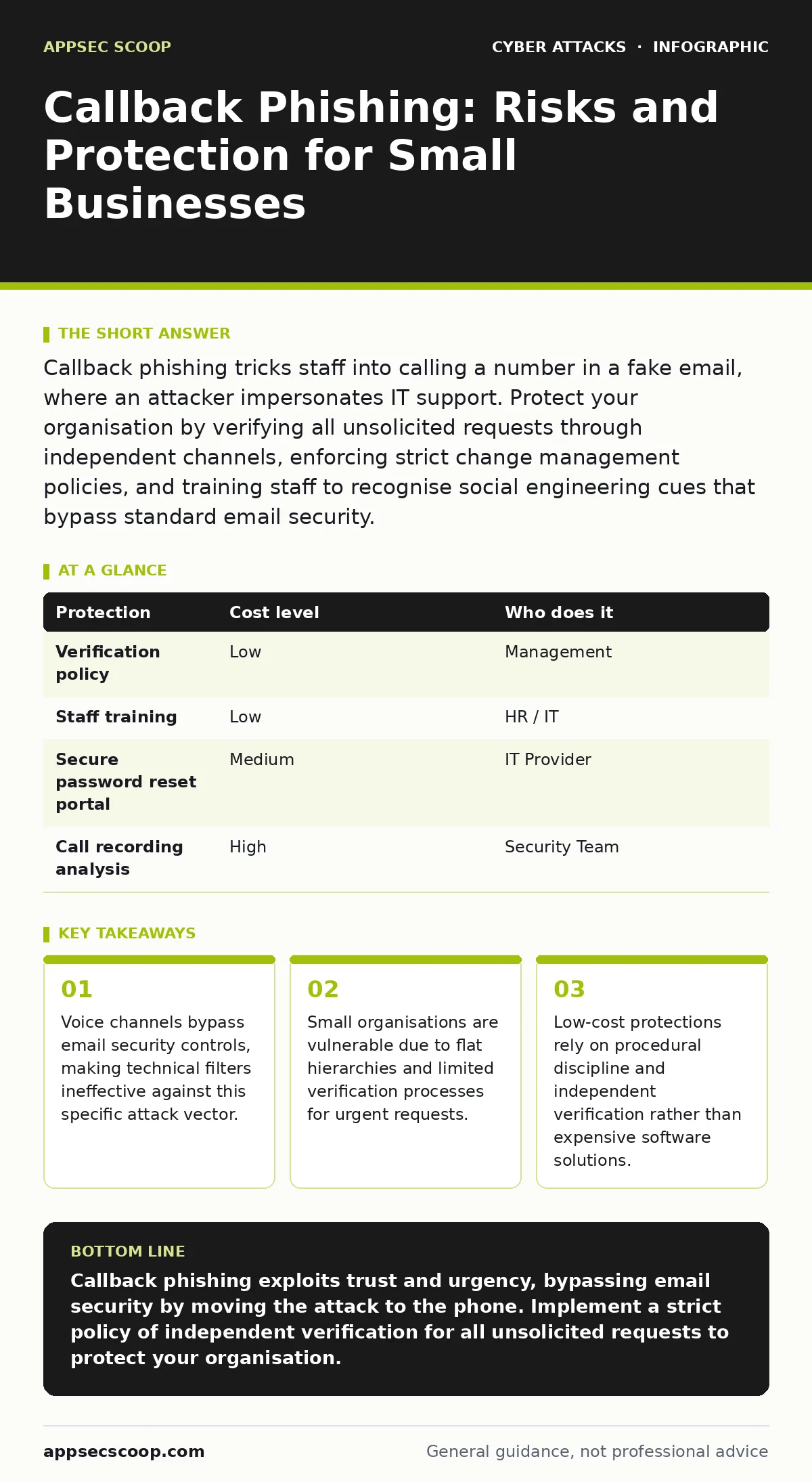
Callback phishing tricks staff into calling a number in a fake email, where an attacker impersonates IT support. Protect your organisation by verifying all unsolicited requests through independent channels, enforcing strict change management policies, and training staff to recognise social engineering cues that bypass standard email security.
The Bypass of Digital Defences
Email security gateways inspect content, headers, and attachments. They look for known malicious signatures or suspicious links. Callback phishing renders these tools largely irrelevant because the dangerous action happens outside the email system. The email contains no malware and no tracking pixels. It simply contains a phone number.
The attacker relies on the recipient’s urgency. By claiming a system failure or security breach, they induce a state of panic. Panic reduces critical thinking. The recipient calls the number to resolve the issue quickly. This shifts the attack surface from the network to the human element.
This method is particularly effective because it mimics legitimate support procedures. Many organisations do encourage calling IT for urgent issues. The attacker exploits this trust. They do not need to hack the email server. They only need to send a convincing message.
Why Small Organisations Are Exposed
Small businesses often operate with flat hierarchies. Decisions are made quickly, and verification steps are minimal. In a large corporation, a request to reset a password might require a ticket number and manager approval. In a small firm, a colleague might simply ask for the password over the phone.
There is often a single point of failure in IT support. If one person handles all technical issues, staff become accustomed to trusting that voice. Attackers study public information to identify this person. They then clone the voice or use social engineering to impersonate them.
The lack of dedicated security staff means there is no one to monitor for these patterns. Small teams react to incidents rather than preventing them. They may not have the resources to implement advanced voice authentication or call recording analysis. This creates a gap that attackers exploit.
The Mechanics of the Attack
The attack begins with reconnaissance. The attacker gathers information about the organisation. They find the IT manager’s name on LinkedIn. They note the company’s email format. They may even identify the phone system vendor from public job postings.
The phishing email is crafted to look internal. It uses the correct logo and formatting. The subject line suggests urgency. "Immediate Action Required: Security Alert" is a common theme. The body text explains the problem and provides a direct dial number.
When the victim calls, the attacker answers. They introduce themselves as IT support. They ask for the victim’s name and department. This builds rapport. Then they ask for credentials or remote access codes. The victim provides them, believing they are helping to secure the system.
Low-Cost Protections
You can mitigate this risk without significant expenditure. The primary defence is procedural. Establish a rule that no credentials are ever shared via phone. This must be a strict policy. Exceptions create vulnerabilities.
Implement a callback verification process. If someone calls claiming to be IT, hang up. Use a known, trusted number to call them back. Do not use the number provided in the email or the caller ID. Caller ID can be spoofed.
Train staff to recognise the signs of urgency. Legitimate IT issues are rarely solved by providing a password. They are solved by resetting it through a secure portal. Emphasise this distinction in training.
| Protection | Cost level | Who does it |
|---|---|---|
| Verification policy | Low | Management |
| Staff training | Low | HR / IT |
| Secure password reset portal | Medium | IT Provider |
| Call recording analysis | High | Security Team |
What to Ask an IT Provider
Your IT provider plays a key role in defence. They must understand the risk of social engineering. Ask them how they handle password resets. If they reset passwords over the phone, they are part of the risk.
Inquire about multi-factor authentication. This adds a layer of security that passwords alone cannot provide. Even if an attacker gets the password, they cannot log in without the second factor.
Discuss the incident response plan. How will they detect unauthorised access? Can they identify accounts that were compromised via social engineering? You need visibility into account activity.
- How do you verify the identity of someone requesting a password reset?
- Do you use multi-factor authentication for all administrative accounts?
- Can you provide logs of administrative actions for audit purposes?
- What is your process for detecting unauthorised access after the fact?
- How do you train staff to recognise social engineering attempts?
See also: Deepfake Fraud: Risks and Protection for Small Businesses · Bootkits: Risks and Protection for Small Businesses
Related Security Concepts
Understanding callback phishing helps you see other attack vectors. For instance, spear phishing uses similar personalisation but focuses on email content. Both rely on trust and urgency.
Malicious email attachments require the user to open a file. Callback phishing requires the user to make a call. Both bypass technical filters by relying on human action.
Cyber hygiene practices, such as regular password changes, help limit the damage if credentials are stolen. However, they do not prevent the initial breach.
Intrusion detection systems can alert you to unusual login activity. This helps you respond quickly after a breach. They do not stop the social engineering attack itself.
Building Resilience
Resilience comes from layered defence. Technical controls stop automated attacks. Procedural controls stop human errors. Training reinforces both.
Regularly review your policies. Ensure they are clear and easy to follow. Test them with simulations. See how staff react to urgent requests.
Monitor for changes in behaviour. If a staff member suddenly accesses files they do not usually touch, investigate. Early detection limits the damage.
Key takeaways
- Voice channels bypass email security controls, making technical filters ineffective against this specific attack vector.
- Small organisations are vulnerable due to flat hierarchies and limited verification processes for urgent requests.
- Low-cost protections rely on procedural discipline and independent verification rather than expensive software solutions.
Callback phishing exploits trust and urgency, bypassing email security by moving the attack to the phone. Implement a strict policy of independent verification for all unsolicited requests to protect your organisation.
Frequently asked questions
Can caller ID spoofing be detected?
Standard telephone systems do not reliably detect spoofing. You must verify the caller through an independent channel, such as a known internal directory number, rather than trusting the displayed number.
Is multi-factor authentication enough?
Multi-factor authentication adds a significant barrier. However, attackers may try to bypass it by requesting the second factor or using session hijacking. It reduces risk but does not eliminate the need for verification.
How often should we train staff?
Training should be continuous. Regular, short reminders are more effective than annual seminars. Incorporate social engineering awareness into daily operations and incident reviews.
What if a staff member falls for it?
Act immediately. Reset the compromised credentials. Revoke active sessions. Investigate the account for unauthorised changes. Report the incident to your IT provider and update your security protocols.
How this guide was produced: written by the AppSec Scoop editorial team with AI assistance, checked against the public references listed below, and reviewed when the facts change. See our editorial policy or report an error.