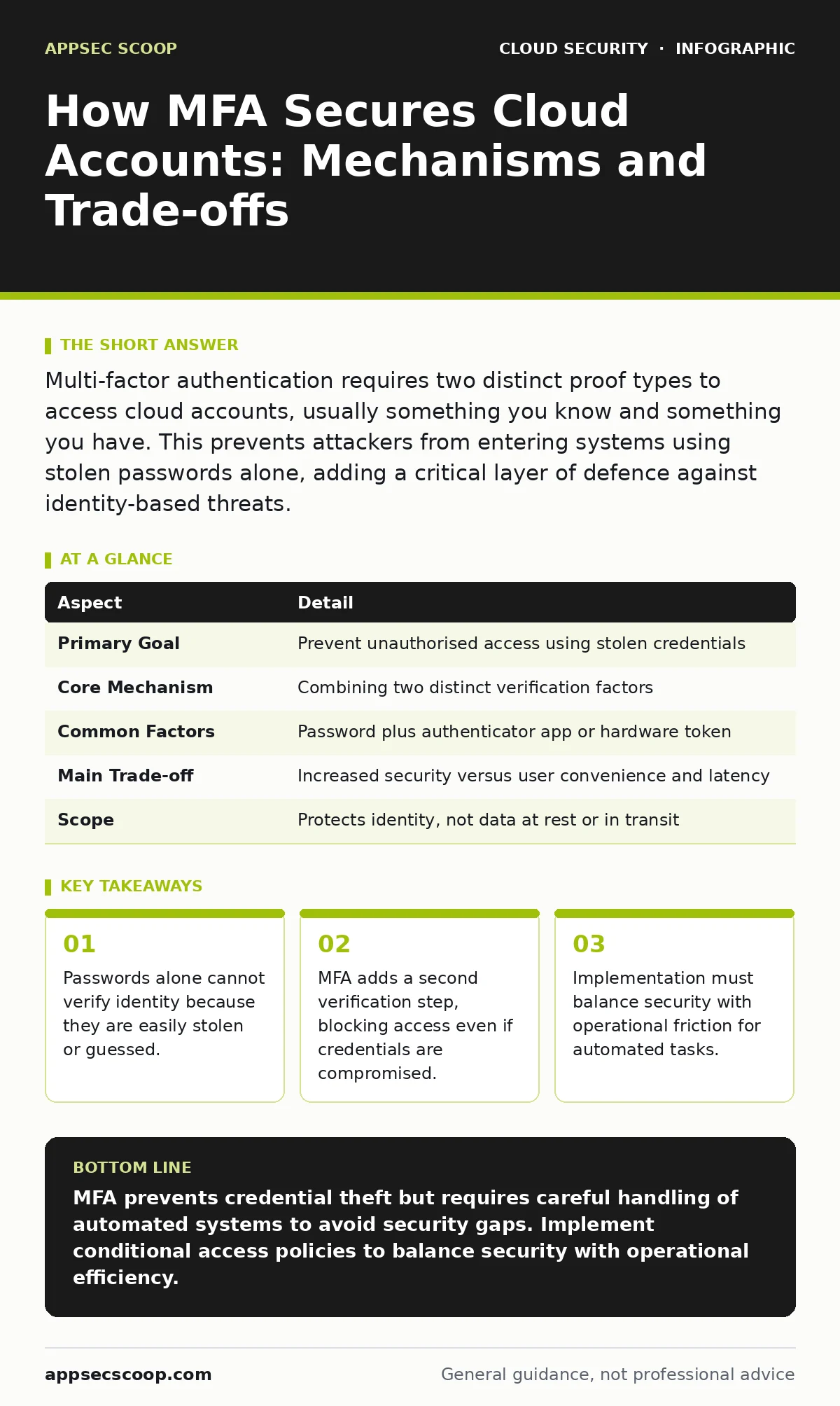
Multi-factor authentication requires two distinct proof types to access cloud accounts, usually something you know and something you have. This prevents attackers from entering systems using stolen passwords alone, adding a critical layer of defence against identity-based threats.
The Analogy of the Office Building
Imagine a high-security office building. The front door has a keypad. Anyone with the code can enter the lobby. This is like a password. It proves you know something, but it does not prove who you are. The code can be written on a sticky note, shared by mistake, or guessed by someone watching your fingers.
Now imagine that inside the lobby, there is a turnstile. It only opens when you present a physical keycard. Even if someone has the keypad code, they cannot enter the secure offices without the card. This second step is the essence of multi-factor authentication. It ensures that knowing the secret is not enough; you must also possess a physical or digital object.
This model works because it attacks two different vulnerabilities. If an attacker steals your password, they still lack your keycard. If they steal your keycard, they still lack the code. They need both to gain entry.
Defining the Mechanism
Multi-factor authentication, or MFA, is a security method that requires two or more independent credentials to verify a user’s identity. These credentials fall into three categories: something you know, something you have, and something you are.
Something you know is typically a password or PIN. Something you have is a physical device, such as a smartphone running an authenticator app, a hardware token, or a smart card. Something you are refers to biometric data, such as a fingerprint or facial recognition scan.
For cloud accounts, the most common combination is a password and a smartphone app. The app generates a time-based one-time password, or TOTP. This six-digit code changes every thirty seconds. It proves you have the phone linked to the account at that specific moment.
| Aspect | Detail |
|---|---|
| Primary Goal | Prevent unauthorised access using stolen credentials |
| Core Mechanism | Combining two distinct verification factors |
| Common Factors | Password plus authenticator app or hardware token |
| Main Trade-off | Increased security versus user convenience and latency |
| Scope | Protects identity, not data at rest or in transit |
The Problem of Credential Theft
Passwords are a single point of failure. If an attacker obtains your password through phishing, a data breach, or keylogging, they have full access to your account. This is known as credential stuffing or password spraying. Attackers automate these attacks, trying millions of common passwords across many services.
MFA solves this by rendering the stolen password useless. Even if the attacker has the correct password, the cloud provider will reject the login attempt without the second factor. The attacker is stuck at the door with the code but no keycard.
This protection extends to session hijacking. Some attacks try to steal the active session cookie after you log in. Modern MFA implementations often bind the session to the device or require re-authentication for sensitive actions, making stolen sessions harder to exploit.
Where MFA Fits in Defence
MFA is part of a broader identity and access management strategy. It sits at the perimeter of identity verification. It does not replace the need for least privilege. If an attacker does manage to bypass MFA, they should have minimal permissions. This limits the damage they can cause.
Consider how this relates to overprivileged cloud identities. An account with excessive permissions is a high-value target. MFA reduces the likelihood of compromise, but it does not reduce the impact if compromise occurs. You must combine MFA with strict role definitions.
It also complements network-level controls. Cloud security groups act as firewalls for virtual machines, controlling traffic flow. MFA controls who can configure those groups. One protects the infrastructure; the other protects the administrator. They are distinct layers that must work together.
The Hidden Cost of Automation
Most guides focus on human users. They rarely address the friction MFA introduces for automated systems. Cloud infrastructure relies on scripts, continuous integration pipelines, and deployment tools. These automated agents need to authenticate to make changes.
You cannot ask a script to look at a smartphone and type in a code. This creates a dilemma. If you enforce MFA on all identities, your automation breaks. Teams often respond by creating exceptions. They create service accounts without MFA for scripts. This creates a weak link. These accounts are often long-lived and shared, making them prime targets.
The solution is not to disable MFA. It is to use certificate-based authentication or short-lived tokens for machines. This shifts the trust model from passwords to cryptographic proofs, which are harder to steal and easier to rotate.
See also: CSPM vs CNAPP: Which Cloud Security Tool Fits Your Stack
What People Usually Get Wrong
Many organisations treat MFA as a binary switch. They turn it on and consider the job done. This is a mistake. MFA configuration determines its effectiveness. Using SMS as a second factor is weak. Sim swapping allows attackers to intercept SMS codes by transferring your phone number to their device.
Another common error is ignoring conditional access. MFA should not always be required for every action. For low-risk activities from trusted networks, you might skip the second factor to improve usability. For high-risk actions, such as changing IAM roles or accessing sensitive data, MFA should be mandatory. This is known as adaptive or risk-based authentication.
Integrating with Key Management
Identity security intersects with data security. Bring your own key encryption allows you to manage encryption keys outside the cloud provider. This adds control over data access. However, if the identity managing those keys is compromised, the attacker can decrypt your data.
MFA protects the identity that manages the keys. It ensures that only authorised personnel can rotate or revoke keys. This layering is vital. You cannot rely on MFA alone to protect data, nor can you rely on encryption alone to protect identity. They must be aligned.
Furthermore, consider leaked cloud access keys. These keys are often found in code repositories. If a key is leaked, the associated identity is compromised. MFA does not protect access keys directly, as keys are machine-to-machine authentication. This highlights the need for strict key rotation policies and scanning for secrets in code.
Beyond the Login Screen
MFA is not just about logging in. It is about verifying intent throughout the session. Some cloud providers support step-up authentication. This requires MFA only for sensitive operations. This balances security and usability. It reduces friction for daily tasks while maintaining strict controls for critical changes.
This approach aligns with shift-left security principles. By integrating security checks early in the development lifecycle, you reduce the risk of misconfigurations. MFA is part of this culture. It forces developers and operators to think about identity and access at every stage.
Finally, monitor for anomalies. Even with MFA, behavioural analysis can detect compromised accounts. Unusual login times, locations, or rapid permission changes can trigger alerts. MFA is a strong barrier, but it is not infallible. Continuous monitoring ensures that any breach is detected and contained quickly.
Key takeaways
- Passwords alone cannot verify identity because they are easily stolen or guessed.
- MFA adds a second verification step, blocking access even if credentials are compromised.
- Implementation must balance security with operational friction for automated tasks.
MFA prevents credential theft but requires careful handling of automated systems to avoid security gaps. Implement conditional access policies to balance security with operational efficiency.
Frequently asked questions
Is SMS a safe form of multi-factor authentication?
SMS is vulnerable to sim swapping and interception. It is recommended to use authenticator apps or hardware tokens instead, as they are more secure and resistant to remote attacks.
How does MFA affect automated cloud deployments?
MFA can block automated scripts that rely on password-based login. Use certificate-based authentication or short-lived tokens for service accounts to maintain security without disrupting automation.
Can MFA be bypassed once an attacker is inside the network?
MFA protects the initial login. Once inside, attackers may try to elevate privileges or move laterally. MFA does not protect against insider threats or compromised session tokens, so additional monitoring is required.
What is the difference between MFA and single sign-on?
Single sign-on allows users to access multiple services with one set of credentials. MFA adds an extra verification step to that login process. They are complementary, not mutually exclusive, technologies.
How this guide was produced: written by the AppSec Scoop editorial team with AI assistance, checked against the public references listed below, and reviewed when the facts change. See our editorial policy or report an error.