Avoid running services under high-privileged accounts, restrict write access to system directories, and enforce strict least privilege. Misconfigured tokens, unpatched kernels, and insecure registry settings create predictable paths for attackers to elevate their rights.
Mistake 1: Running Services Under High-Privileged Accounts
Why it hurts:
Services often run under the SYSTEM or Administrator account to access resources. If an attacker can write to the service binary path, they replace the executable. The next service restart executes their code with full system privileges. This bypasses application-level security entirely. The impact is total system compromise.
The fix:
Create dedicated service accounts with minimal permissions. Use the LocalSystem account only when required. Restrict write access to service binary directories using Access Control Lists. Monitor service configuration changes for unexpected modifications.
Mistake 2: Insecure File Permissions on System Directories
Why it hurts:
Attackers exploit weak permissions on directories like C:\Windows\System32. They place malicious DLLs or executables in these paths. Legitimate applications load these files during startup. This technique, known as DLL hijacking, executes attacker code in the context of the trusted application. The application inherits the elevated rights.
The fix:
Audit file permissions on system directories regularly. Remove write access for standard users. Use integrity levels to prevent low-integrity processes from modifying high-integrity files. Validate that application paths do not include insecure default locations.
Mistake 3: Unrestricted Token Privileges for Standard Users
Why it hurts:
Windows tokens contain privileges that grant specific rights. Some privileges, like SeImpersonatePrivilege, allow processes to impersonate other users. Attackers exploit these to steal access tokens from higher-privileged processes. This enables them to elevate their own privileges without cracking passwords. The risk increases with poorly configured security policies.
The fix:
Review the Local Security Policy for unnecessary privileges. Remove SeImpersonatePrivilege from standard user groups where possible. Use Restricted Admin Mode for remote management. Monitor token usage for anomalous impersonation attempts.
Mistake 4: Weak Registry Key Permissions
Why it hurts:
Registry keys store configuration data for services and applications. If a key has weak permissions, attackers can modify it. They change the ImagePath value to point to a malicious executable. When the service starts, it runs the attacker's code. This method bypasses file system checks if the malicious file is in a writable location.
The fix:
Set strict permissions on critical registry keys. Use HKLM\SYSTEM\CurrentControlSet\Services as a reference point. Ensure only SYSTEM and Administrators have write access. Monitor registry modifications for changes to service configurations.
Mistake 5: Unpatched Kernel and Driver Vulnerabilities
Why it hurts:
Kernel drivers operate with the highest privilege level. Vulnerabilities in these drivers allow attackers to execute code in kernel space. This bypasses user-mode protections entirely. Attackers exploit memory corruption flaws to gain code execution. The consequence is immediate and complete system control. Patch management delays increase the attack window significantly.
The fix:
Implement a rigorous patch management strategy. Prioritize kernel and driver updates. Test patches in a staging environment before deployment. Remove unnecessary drivers to reduce the attack surface. Review the patch management guide for detailed procedures.
Mistake 6: Excessive Rights for Application Pools
Why it hurts:
Web applications often run under application pool identities. If these identities have excessive rights, attackers can exploit the application. They may access sensitive files or execute commands. This leads to privilege escalation if the application pool identity has administrative rights. The risk is higher with poorly configured IIS settings.
The fix:
Use dedicated application pool identities with minimal permissions. Restrict file system access to application directories only. Disable unnecessary features in the application pool. Monitor application pool activity for anomalous behaviour.
Mistake 7: Insecure Scheduled Tasks and Cron Jobs
Why it hurts:
Scheduled tasks automate routine operations. If a task runs with high privileges and has weak permissions, attackers can modify it. They change the task action to execute their own code. The task runs at the scheduled time with elevated rights. This provides a reliable path for privilege escalation. The risk is often overlooked in security audits.
The fix:
Audit scheduled tasks for excessive permissions. Restrict write access to task definitions. Use task-specific accounts with minimal rights. Monitor task execution logs for unexpected changes.
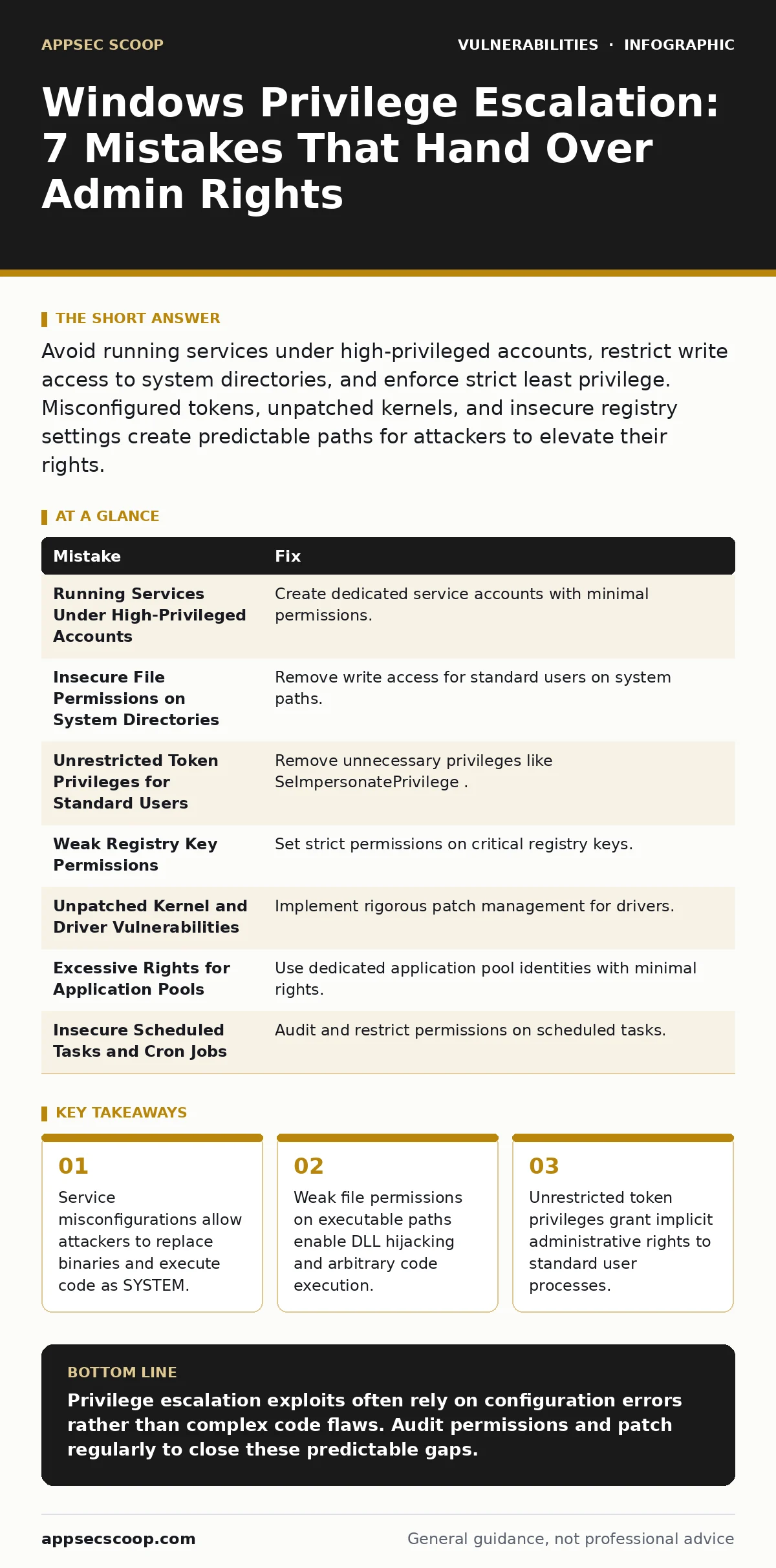
| Mistake | Fix |
|---|---|
| Running Services Under High-Privileged Accounts | Create dedicated service accounts with minimal permissions. |
| Insecure File Permissions on System Directories | Remove write access for standard users on system paths. |
| Unrestricted Token Privileges for Standard Users | Remove unnecessary privileges like SeImpersonatePrivilege. |
| Weak Registry Key Permissions | Set strict permissions on critical registry keys. |
| Unpatched Kernel and Driver Vulnerabilities | Implement rigorous patch management for drivers. |
| Excessive Rights for Application Pools | Use dedicated application pool identities with minimal rights. |
| Insecure Scheduled Tasks and Cron Jobs | Audit and restrict permissions on scheduled tasks. |
Key takeaways
- Service misconfigurations allow attackers to replace binaries and execute code as SYSTEM.
- Weak file permissions on executable paths enable DLL hijacking and arbitrary code execution.
- Unrestricted token privileges grant implicit administrative rights to standard user processes.
Privilege escalation exploits often rely on configuration errors rather than complex code flaws. Audit permissions and patch regularly to close these predictable gaps.
Frequently asked questions
How do I check for misconfigured service permissions?
Use tools like `accesschk` or PowerShell scripts to audit service binary paths and permissions. Look for write access granted to `Users` or `Authenticated Users`.
What is the difference between privilege escalation and lateral movement?
Privilege escalation increases rights on the current system. Lateral movement spreads access to other systems on the network. Both are critical attack phases.
Can application whitelisting prevent privilege escalation?
Application whitelisting prevents unauthorized code execution. It mitigates some escalation vectors but does not fix underlying permission issues. Combine it with least privilege.
How often should I audit file system permissions?
Audit permissions after every significant change. Regular automated scans help detect drift. Integrate permission checks into your risk-based vulnerability management process.
How this guide was produced: written by the AppSec Scoop editorial team with AI assistance, checked against the public references listed below, and reviewed when the facts change. See our editorial policy or report an error.