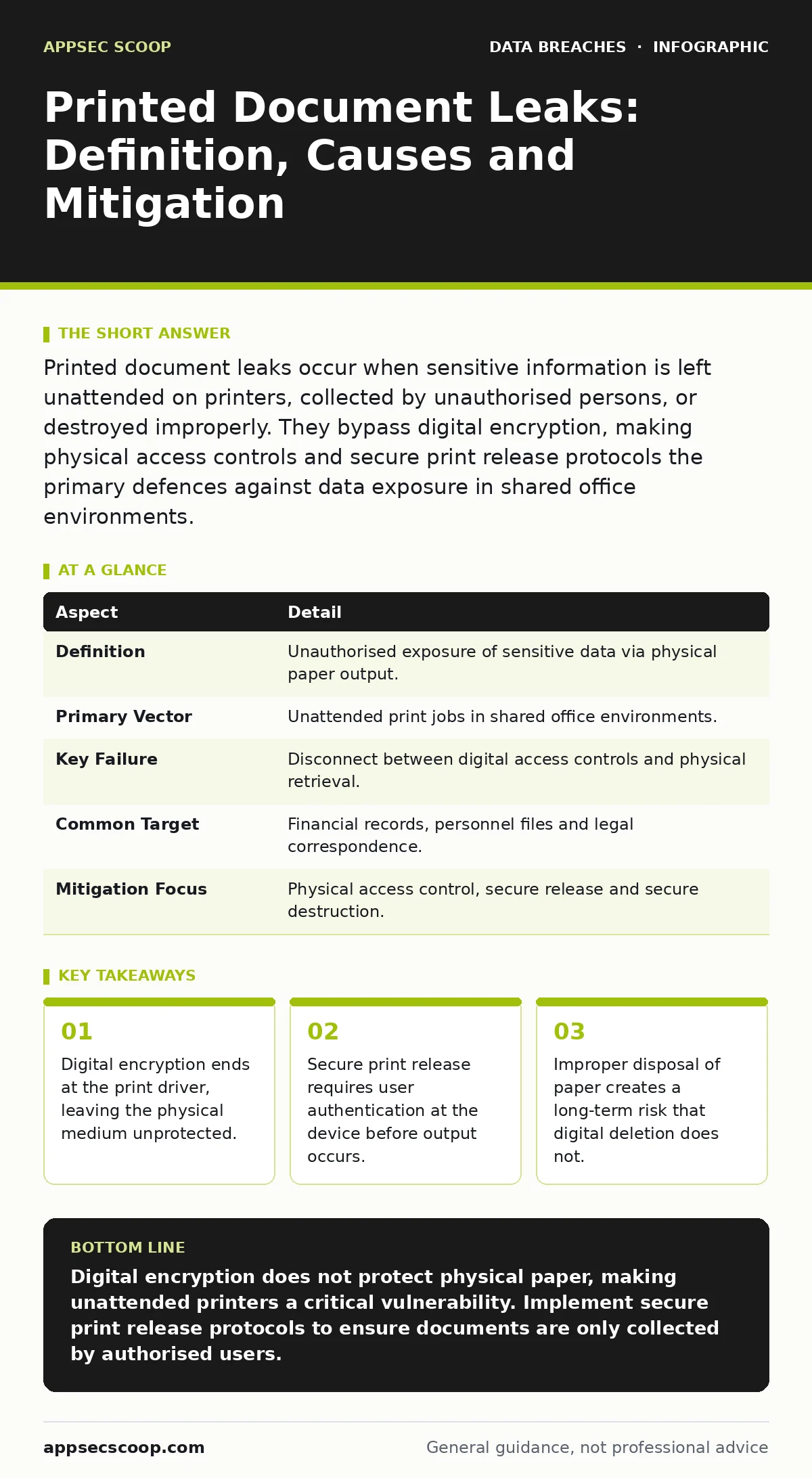
Printed document leaks occur when sensitive information is left unattended on printers, collected by unauthorised persons, or destroyed improperly. They bypass digital encryption, making physical access controls and secure print release protocols the primary defences against data exposure in shared office environments.
The Illusion of Digital Security
Imagine a secure tunnel that transports valuable goods from a factory to a warehouse. The tunnel is monitored, locked and encrypted. However, once the goods exit the tunnel, they are placed on a public sidewalk. If no one collects them immediately, anyone can take them. This is the fundamental flaw in relying solely on digital security for documents that must eventually become physical objects.
Digital security measures protect data while it resides on servers or moves across networks. They do not protect the paper once it emerges from a printer. This gap is where printed document leaks occur. A printed document leak is the unauthorised exposure of sensitive information contained within physical paper output. It happens when the physical handling of the document fails, regardless of how secure the digital file was beforehand.
This phenomenon affects any organisation that uses shared printing infrastructure. It is not limited to large corporations. Small businesses with a single multifunction device are equally vulnerable if staff leave sensitive reports on trays. The risk extends to cloud printing services, where the queue is remote but the output is local and physical.
| Aspect | Detail |
|---|---|
| Definition | Unauthorised exposure of sensitive data via physical paper output. |
| Primary Vector | Unattended print jobs in shared office environments. |
| Key Failure | Disconnect between digital access controls and physical retrieval. |
| Common Target | Financial records, personnel files and legal correspondence. |
| Mitigation Focus | Physical access control, secure release and secure destruction. |
How the Leakage Occurs
The process begins when a user sends a print job to a device. The data travels from the computer to the printer, often passing through a print server or cloud service. At this stage, standard protocols may encrypt the transmission. However, the printer itself is often an open system. It stores jobs in memory or on an internal hard drive. If the device is compromised or accessed physically, these stored jobs can be extracted.
The more common failure point is human behaviour. A user sends a report containing confidential data. They step away to attend a meeting or refill their coffee. The document sits on the output tray. In a busy office, other staff members walk past. Some may glance at the first page out of curiosity. Others may intentionally collect it. This is known as "print harvesting". It requires no technical skill, only opportunism.
Another mechanism involves the wrong recipient. Users often select the wrong printer or fail to notice that a job has printed to a shared general-use device instead of a secure departmental one. The document is then picked up by someone who has no business seeing it. This error is frequent in large organisations with many similar devices.
Who Is Affected and Why It Matters
You might assume that only highly regulated industries face this risk. In reality, any entity that produces physical records is exposed. Healthcare providers print patient details. Law firms print case strategies. Retailers print shipping manifests with customer addresses. The impact varies, but the mechanism is identical.
For security operations teams, the challenge is that these leaks often go unreported. A lost piece of paper is easy to ignore. It does not trigger an intrusion detection system. It does not generate a log entry in a security information and event management platform. This silence makes it difficult to measure the scale of the problem. It also means that breach dwell time for physical leaks can be indefinite, as the paper may circulate before anyone realises it is missing.
The consequences extend beyond immediate data loss. If the document contains personal information, you may face obligations regarding data subject rights. You must be able to account for where the data went and whether it was compromised. Without a physical audit trail, this accountability is nearly impossible to establish.
Common Forms of Physical Exposure
Printed document leaks manifest in several distinct forms. Understanding these forms helps in designing specific controls.
- Unattended Output: The most frequent form. Documents left on trays or in trays that are not locked.
- Misrouted Jobs: Documents printed to the wrong device, often due to user error or confusing network naming conventions.
- Draft and Error Pages: Printers often output test pages or error reports that may contain fragments of sensitive data from previous jobs.
- Improper Disposal: Documents that are no longer needed are thrown in general waste bins instead of being shredded. This is a form of leak that occurs after the document has served its purpose.
Draft pages are particularly insidious. They are often overlooked because they appear to be technical noise. However, they can contain headers, footers or data fields from the jobs that preceded them. If a printer uses a shared buffer, fragments of one user's data may appear on another user's test page.
What People Usually Get Wrong
There is a widespread misconception that encrypting the file prevents physical leaks. Encryption protects data at rest and encryption in transit. It ensures that if the file is stolen from a laptop or intercepted on the network, it cannot be read. It does nothing to prevent the printer from producing a readable copy. Once the print driver processes the file, the encryption is removed to allow the printer to render the text and images.
Another common error is assuming that data masking applied in the software layer persists to the printout. If you mask credit card numbers on a screen, you must ensure the same masking applies to the print job. Many applications do not automatically carry over these visual filters to the printer output. The full data is often sent to the printer even if the screen shows only partial information.
You may also believe that remote wiping of devices solves the problem. Remote wipe works for laptops and phones. It does not work for a piece of paper sitting on a desk. Physical security requires physical controls. Relying on IT tools to solve a physical problem is a category error that leaves a significant gap in your defence.
See also: Third Party Risk Assessment Checklist for Vendor Security · Data Masking: How to Hide Sensitive Data Without Breaking Applications
Reducing the Risk
Mitigating printed document leaks requires a combination of technology and policy. The goal is to ensure that only the intended recipient can access the physical document.
Secure Print Release is the most effective technical control. This feature holds the job in the printer's memory until the user authenticates at the device. Authentication can be via a PIN code, a smart card or a mobile app. The document only prints when the authorised user is standing at the machine. This eliminates the risk of unattended output. It also prevents misrouted jobs, as the user selects the destination at the moment of release.
Physical access controls are equally necessary. Printers should be located in areas with restricted access. Open-plan offices with central printers are high-risk zones. Consider placing secure printers within departments rather than in shared corridors. This reduces the number of people who have casual access to the output.
Disposal procedures must be strict. General waste bins are not suitable for documents containing sensitive information. Use cross-cut shredders for on-site destruction. For large volumes, use accredited destruction services that provide certificates of destruction. This creates an audit trail for compliance purposes.
Integrating with Broader Security
Printed document leaks are often treated as a separate issue from digital security. They should not be. They are part of the same data lifecycle. If you manage secrets management for your applications, you must consider the output of those applications. If you are focused on database security, remember that the data extracted from the database often ends up on paper.
Ignoring the physical endpoint undermines your digital efforts. It is like building a high-security vault and leaving the door open. By integrating physical controls with your digital security strategy, you create a consistent defence. This includes regular audits of printing policies and training staff on the risks of unattended documents.
Practical Steps for Implementation
Start by auditing your current printing environment. Identify all devices that handle sensitive data. Check if they support secure print release. If they do not, plan for replacement or upgrade. Configure devices to clear their memory after each job. This prevents data from lingering on the device's hard drive.
Update your incident response plan to include physical leaks. Define what constitutes a leak and how to report it. Ensure that staff know how to report a lost document. Without a reporting mechanism, you cannot measure the effectiveness of your controls.
Finally, review your disposal practices. Ensure that shredders are available and functioning. Monitor waste bins to ensure no sensitive documents are being discarded improperly. This simple check can prevent many leaks that occur after the document has been used.
Key takeaways
- Digital encryption ends at the print driver, leaving the physical medium unprotected.
- Secure print release requires user authentication at the device before output occurs.
- Improper disposal of paper creates a long-term risk that digital deletion does not.
Digital encryption does not protect physical paper, making unattended printers a critical vulnerability. Implement secure print release protocols to ensure documents are only collected by authorised users.
Frequently asked questions
Does using a secure printer driver prevent leaks?
A secure driver protects data during transmission and processing, but it cannot prevent a user from leaving the printed paper unattended on the output tray.
How do I know if my printer supports secure release?
Check the device specifications for features like "PIN release", "badge release" or "hold print". Consult the manufacturer's documentation for configuration details.
Is cloud printing safer than local printing?
Cloud printing can improve logging and access control, but the final output is still physical. The risk shifts from the network to the physical collection point.
How this guide was produced: written by the AppSec Scoop editorial team with AI assistance, checked against the public references listed below, and reviewed when the facts change. See our editorial policy or report an error.