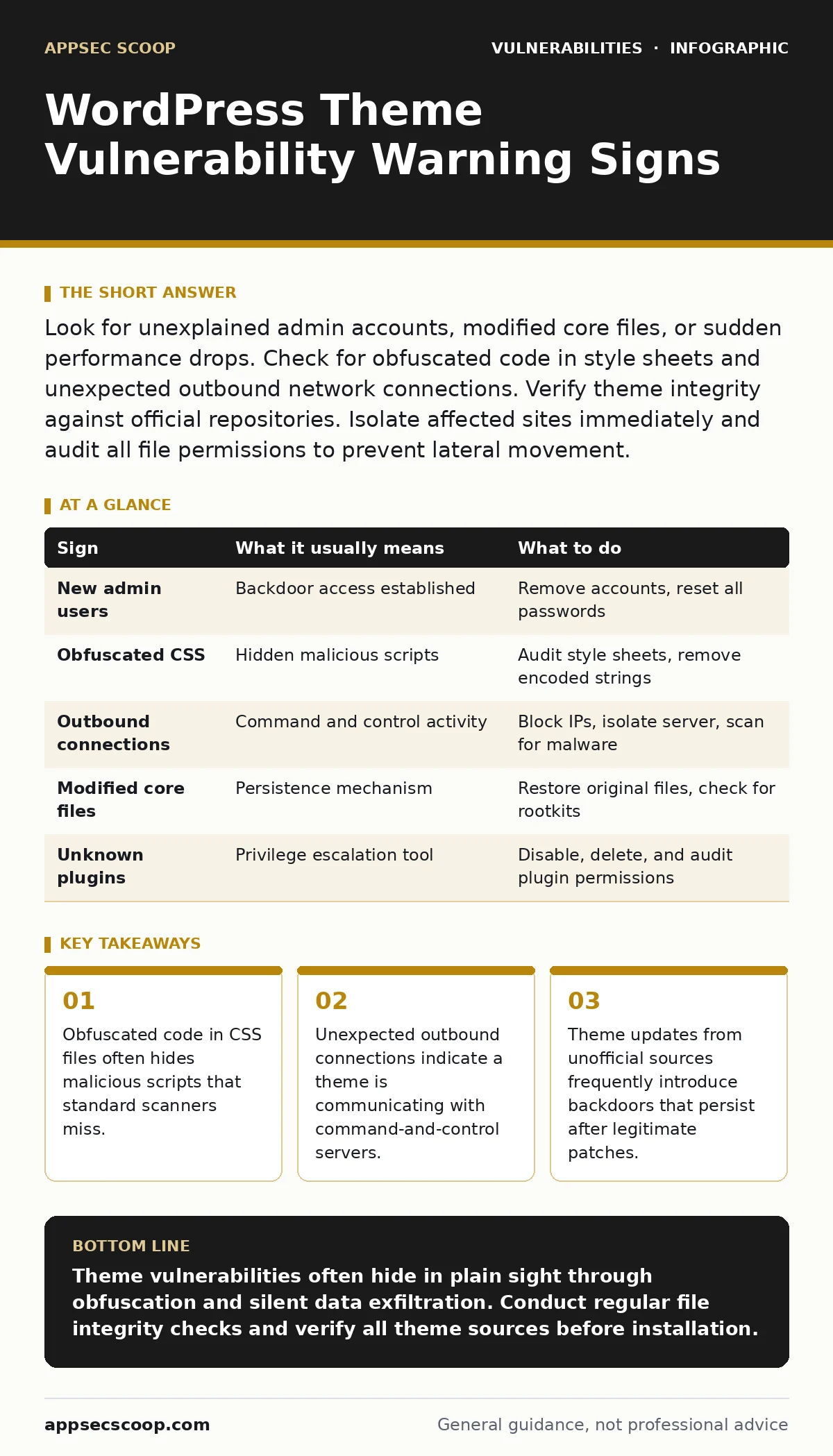
Look for unexplained admin accounts, modified core files, or sudden performance drops. Check for obfuscated code in style sheets and unexpected outbound network connections. Verify theme integrity against official repositories. Isolate affected sites immediately and audit all file permissions to prevent lateral movement.
Visible Indicators of Compromise
You notice visible signs when the attacker’s code executes in the browser or alters the site’s public-facing structure. These are the loudest warnings but often appear after initial access has been established. Unexplained new administrator accounts appear in the user list without your authorisation. These accounts usually have generic usernames and lack email addresses. Sudden changes to page content, such as hidden links or altered text, indicate the theme’s template files have been modified. Performance degradation occurs when malicious scripts consume server resources during page loads.
Subtle Signs That Slip Past Reviews
Silent vulnerabilities remain hidden because they do not alter the visual appearance of the site. They operate in the background, waiting for specific triggers or maintaining persistent access. Check the theme’s style sheets for long strings of alphanumeric characters. This is obfuscated code designed to evade casual review. Legitimate CSS rules are human-readable. Long, random strings often contain encoded PHP or JavaScript commands. Unexpected outbound network connections from your server to unknown IP addresses suggest data exfiltration or command retrieval.
The Cost of Unofficial Sources
Themes downloaded from unofficial repositories carry a higher risk of embedded malware. These packages often modify core WordPress files to maintain persistence even after you delete the malicious theme. The attacker may replace standard functions with custom versions that bypass security checks. This technique mirrors the complexity seen in insecure file permissions, where incorrect settings allow unintended access. You must verify the source of every theme. Official directories undergo basic screening, but third-party marketplaces vary widely in their vetting processes.
File Integrity Verification
Regular file integrity checks detect unauthorized modifications to theme files. Compare your current theme files against a clean copy from the official repository. Look for files that have been added recently or modified without a corresponding update. Pay attention to files in unexpected directories. Theme files should reside within their designated folder. Files placed in the root directory or other theme folders indicate an attempt to bypass standard containment. Use checksums to verify that critical files match their original hashes.
| Sign | What it usually means | What to do |
|---|---|---|
| New admin users | Backdoor access established | Remove accounts, reset all passwords |
| Obfuscated CSS | Hidden malicious scripts | Audit style sheets, remove encoded strings |
| Outbound connections | Command and control activity | Block IPs, isolate server, scan for malware |
| Modified core files | Persistence mechanism | Restore original files, check for rootkits |
| Unknown plugins | Privilege escalation tool | Disable, delete, and audit plugin permissions |
Response Procedures for Detected Issues
When you identify a vulnerability, immediate containment is necessary. Isolate the affected site from the network to prevent lateral movement. Disable the compromised theme and switch to a default, trusted theme. This stops the malicious code from executing. Do not simply delete the theme, as this may leave residual files. Perform a full system scan using reputable security tools. Check for additional compromised accounts or modified files. Review server logs to understand the scope of the breach.
Preventing Future Theme Exploits
Prevention requires strict control over what code runs on your server. Only install themes from verified sources. Enable two-factor authentication for all administrative accounts. This adds a layer of security even if credentials are stolen. Regularly update your WordPress core, themes, and plugins. Outdated software often contains known vulnerabilities that attackers exploit automatically. Implement a web application firewall to filter malicious requests before they reach your site. This reduces the attack surface significantly.
Understanding the Attack Surface
Theme vulnerabilities often serve as an entry point for more severe exploits. Once an attacker gains access via a theme, they may seek to escalate privileges. This could lead to remote code execution vulnerabilities, allowing full control of the server. Understanding the broader context of attack vectors in CVSS helps you prioritise fixes. Not all vulnerabilities are equal. Those that allow remote execution without authentication are far more dangerous than those requiring user interaction. Prioritise patching based on severity and exploitability.
Long-Term Maintenance Strategies
Security is an ongoing process, not a one-time fix. Establish a routine for reviewing new themes before installation. Check for recent updates and known issues. Monitor your site’s performance and traffic patterns for anomalies. Document every change made to the site. This creates an audit trail that helps identify when and how compromises occur. Regular backups allow you to restore your site to a known good state. Store backups offline to protect them from ransomware or other destructive attacks.
Key takeaways
- Obfuscated code in CSS files often hides malicious scripts that standard scanners miss.
- Unexpected outbound connections indicate a theme is communicating with command-and-control servers.
- Theme updates from unofficial sources frequently introduce backdoors that persist after legitimate patches.
Theme vulnerabilities often hide in plain sight through obfuscation and silent data exfiltration. Conduct regular file integrity checks and verify all theme sources before installation.
Frequently asked questions
How do I know if a theme has a backdoor?
Look for obfuscated code in CSS or JavaScript files, unexpected outbound connections, and new administrative accounts you did not create.
Should I delete a compromised theme immediately?
No, isolate the site first and back up the files for forensic analysis. Deleting the theme may remove evidence needed to understand the full scope of the breach.
Can a theme vulnerability affect other plugins?
Yes, if the theme grants high-level privileges, attackers can use it to install or modify other plugins, expanding their control over the site.
How often should I update my themes?
Update themes as soon as security patches are released. Regular updates close known vulnerabilities and reduce the window of opportunity for attackers.
How this guide was produced: written by the AppSec Scoop editorial team with AI assistance, checked against the public references listed below, and reviewed when the facts change. See our editorial policy or report an error.